
Using Index Worker
Create multiple jobs across different analysis dimensions
Section titled “Create multiple jobs across different analysis dimensions”For example, on an e-commerce site, you might create separate jobs for product pages and listing pages. For a large site, you might also create jobs for product categories.
For a media site with many new articles, we recommend using an RSS feed to track when new articles are indexed.
How you should design jobs depends on the website, product, and URL structure.
When designing jobs this way, consider how often pages are updated and which important pages you want to get indexed. You can also manage indexing more efficiently by adjusting the investigation frequency for each job.
Analyze results
Section titled “Analyze results”You can use URL filters to narrow results to various states. Clicking a status row also applies a filter. This lets you view groups such as “URLs that were discovered but not crawled” or “URLs that were crawled but not indexed.”
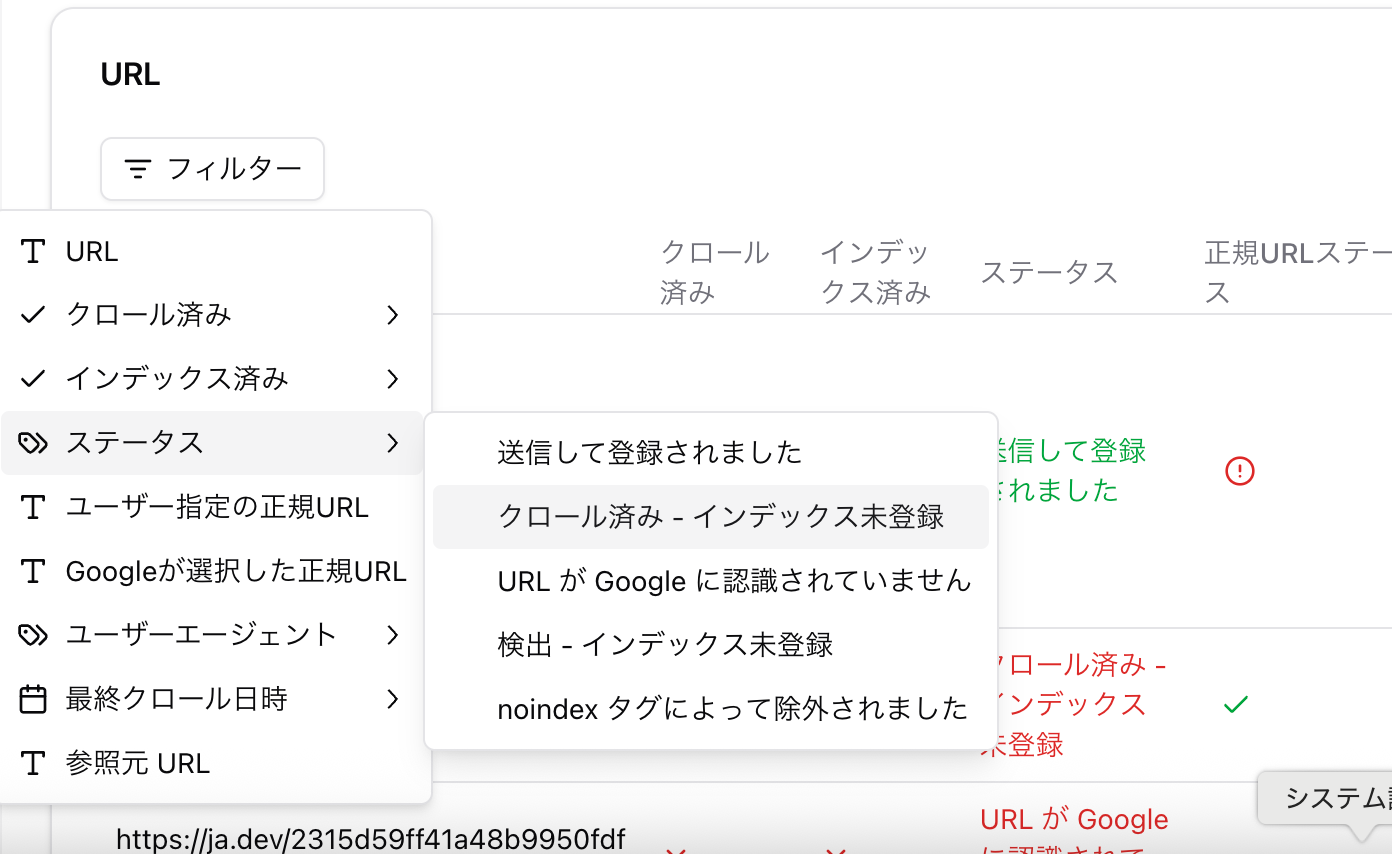
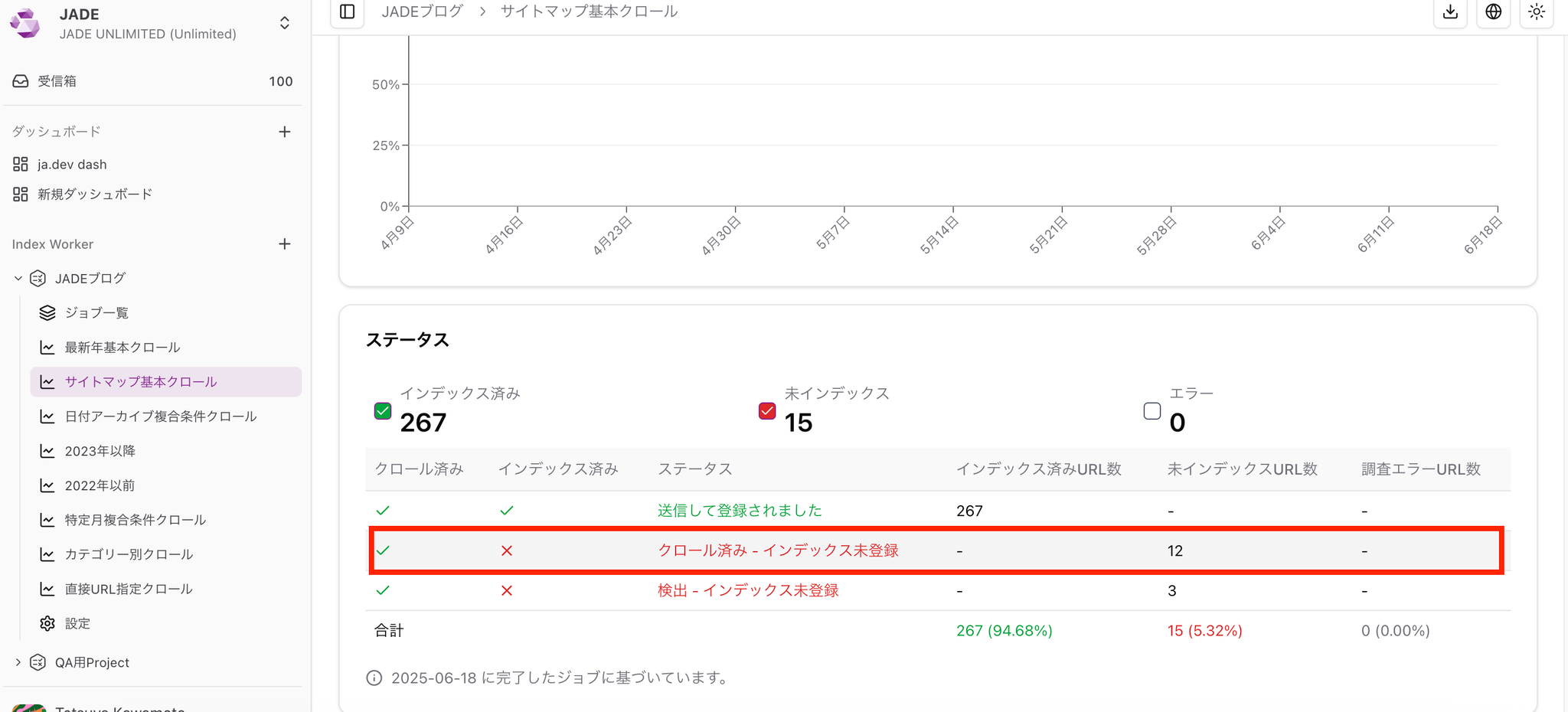
If important pages are not being crawled or indexed, investigate the cause.
-
Filter only the “URL is unknown to Google” status and investigate why the URLs are not being discovered.
-
Compare pages that were not crawled with pages that were crawled during the same period.
-
Compare pages that were crawled but not indexed with pages that were crawled and indexed during the same period.
Use analysis and comparisons like these to identify why pages were not crawled or indexed.
🖌️ Example: After filtering only pages that were not indexed and reviewing them manually, you find that they are pages with low content volume.
You can also export the details as CSV or Excel.
When a page is crawled but not indexed, possible causes include low content quality, similar content, or tag issues.
On large sites, if pages are not being crawled or crawl frequency is low, crawl budget may be wasted on unimportant pages. Effective measures include controlling unnecessary parameters with robots.txt and optimizing sitemaps so important pages are crawled first.
Status explanations
Section titled “Status explanations”Submitted and indexed
The URL has been crawled and indexed. There is no issue.
Crawled - currently not indexed
Google crawled the URL, but did not index it for some reason.
- Content quality: The content may be thin or low value. Recheck whether the page is useful for users, and improve the content if needed.
- Duplicate content: If multiple pages have the same or similar content, Google may not know which page to index. Use canonical tags or redirects to clearly indicate which page should be prioritized.
- Meta tags and HTTP status codes: Check whether the page has a
noindextag, or whether the HTTP status code is something other than 200.
Alternate page with proper canonical tag
The URL was detected by the crawler, and the canonical tag is set correctly. Google recognizes this page as an alternate page and indexes the URL specified by the canonical tag. In general, there is no issue.
Not found (404)
This means the URL returned a 404 error, page not found, when Google’s crawler accessed it. The page may have been deleted, moved, or the URL may be incorrect. If the 404 error is not intentional, consider setting a redirect to the correct URL or restoring the page.
URL is unknown to Google
The URL has not been discovered by Google’s crawler. Google’s crawler may not have found it yet, or may not have determined that it is worth crawling. Try improving internal links or adding it to a sitemap.
Page with redirect
This means the URL was detected by Google’s crawler and redirects to another URL. It appears when a 301, permanent, or 302, temporary, redirect is configured. Check whether the redirect destination is indexed appropriately, and investigate whether there are unnecessary redirect chains.
Use “URL history”
Section titled “Use “URL history””You can check a URL’s status history from “URL history” on the right side of the URL table.


Use “Run once” to test hypotheses
Section titled “Use “Run once” to test hypotheses”“Maybe pages with a certain condition are less likely to be indexed…”
In this case, it is effective to manually collect the target URLs, create a CSV, and run the job once.
For CSV, no header row is required. Prepare a file that lists only URLs separated by commas.