
Amethyst AI
An AI Agent analyzes your Amethyst data. It can also perform Amethyst operations for you, such as creating analysis views and projects.
You can use it for a wide range of tasks, including getting data-based improvement suggestions, brainstorming ideas, and delegating time-consuming operations such as setting display periods.

You can access Amethyst AI from the upper-left corner of the screen.

This video by a JADE team member explains Amethyst AI. The explanation starts at 5:30.
Talking about Amethyst AI - JADE Lounge
Sample prompts
Section titled “Sample prompts”Amethyst AI can provide useful analysis in a wide range of situations.
-
Based on last month’s GSC data, tell me the top 10 queries by clicks.
-
In GA4, compare sessions and conversion rate over the past 28 days by default channel.
-
Create a Search Analytics view that includes only mobile users.
-
Based on last month’s GSC data, tell me which queries have room for overall improvement and how to improve them.
-
Tell me which pages have increased traffic compared with last month.
-
Create a summary report of this quarter’s SEO performance.
-
I want to increase organic search traffic by creating new content. Based on the data in the sample project, give me 10 queries that could help increase traffic.
-
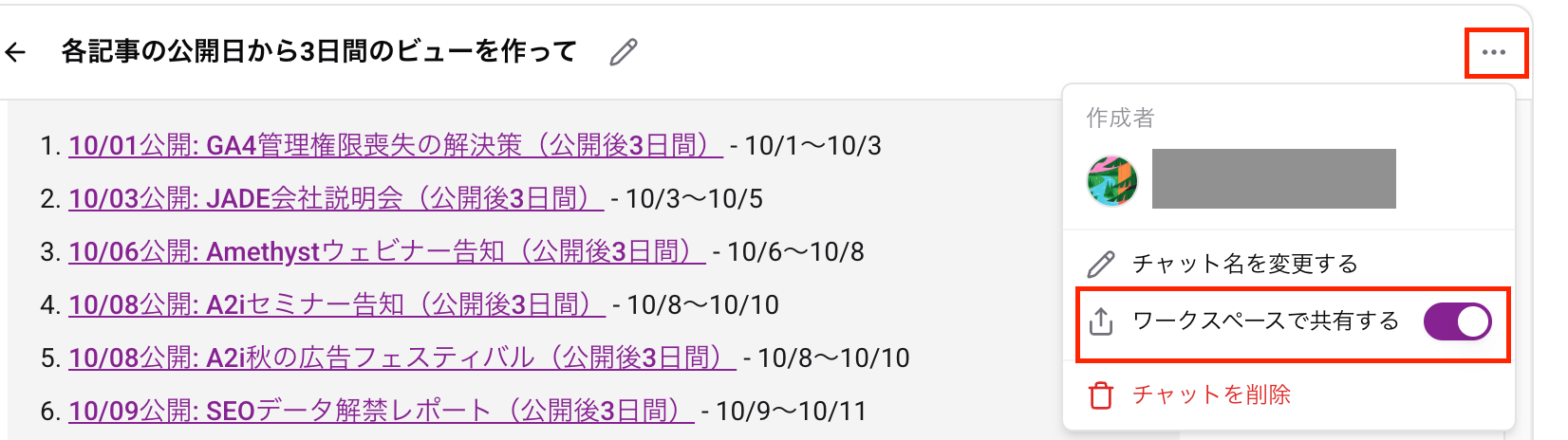
I want to analyze traffic for the first three days after each article was published. Create a separate view for each article published in October.
-
Extract the top five landing pages for sessions that converted via Organic Search.

- You can open Amethyst AI in the sidebar from the button in the upper-right corner of each screen. From there, you can discuss the view you are currently looking at.


- Conversations can be shared within the workspace. This is off by default.
Models
Section titled “Models”Higher-tier models are available only with certain options.
| Model name | Overview | Available options |
|---|---|---|
| Claude Opus 5.5 | Anthropic’s top model for long-running agentic tasks and knowledge work. | PRO or higher |
| Claude Sonnet 5.5 | An everyday agent model for planning, research, and general work. It sits between Opus and Haiku. | Standard or higher |
| Claude Haiku 4.5 | A fast model for responsive assistance and lightweight tasks. | Standard or higher |
| Gemini 3.1 Pro Preview | A reasoning-first Gemini model for complex problem solving. Gemini has a large context window and is suited to large tasks and long interactions. | PRO or higher |
| Gemini 3.8 Flash | Google’s most intelligent Flash model, built for long-horizon autonomous agents and complex workflows. Gemini has a large context window and is suited to large tasks and long interactions. Flash responds faster than Pro. | Standard or higher |
| GPT-6 Astra | OpenAI’s most capable model for complex reasoning, research, and document creation. Counts twice against the AI usage quota. | PRO or higher |
| GPT-6 Sol | An OpenAI model for complex, agentic workflows. | PRO or higher |
| GPT-6 Luna | OpenAI’s most efficient model for focused, high-volume tasks. | Standard or higher |
🔗 Adapted from each model’s official documentation.
Gemini models | Gemini API | Google AI for Developers
-
Amethyst AI is enabled for the entire workspace and can be used by anyone with Editor permissions or higher.
-
Submitted content may be used to improve the feature.
-
Amethyst AI’s responses may be inaccurate. Always verify important information yourself.
-
Please do not use Amethyst AI for unrelated purposes, such as purposes that are not related to Amethyst, SEO, or data analysis.