
Workspaces / Projects / Views
Overview Diagram
Section titled “Overview Diagram”graph TD
%% Contract owner
Contract["One payment contract"]
%% Workspace group
subgraph main_ws [Workspaces]
direction LR
WSA["Workspace A"]
WSB["Workspace B<br>(some plans only)"]
WSC["Workspace C<br>(some plans only)"]
end
%% Contract and workspace relationship
Contract --> main_ws
%% Features for Workspace A
subgraph FuncA ["Features"]
direction LR %% Arrange feature blocks horizontally
subgraph UserAnalytics [User Analytics]
UA_A["Project A"]
UA_B["Project B"]
end
subgraph SearchAnalytics [Search Analytics]
SA_A["Project A"]
SA_B["Project B"]
end
subgraph IndexWorker [Index Worker]
IW_A["Project A"]
IW_B["Project B"]
end
end
%% Workspace and feature relationship
WSA --> FuncA
Workspaces
Section titled “Workspaces”Some plans allow multiple workspaces under a single payment contract.
You can select a workspace or create a new workspace from the top left of the screen.

✅ Owner permissions are required to create a new workspace.
Multiple workspaces are useful when you want to restrict access by company department, or when you want to grant Amethyst permissions separately for each client in client work.
Examples:
-
Tanaka has member access to Workspace A.
-
Sato has member access to Workspace B.
-
Suzuki has administrator access to both Workspace A and Workspace B.
This lets you control user access at the workspace level.
📌 Multiple sites and multiple Search Console properties can be managed with projects, described below. Workspaces are a feature for user access control.
Projects
Section titled “Projects”The items listed in the left menu are “projects.” You can create multiple projects within each feature. Each project can contain multiple views, such as graphs and tables.
💡 You can change the connected site or property for each project. Even for the same site, we recommend using separate projects for different analysis scopes.
Search Analytics and User Analytics also support project-level filters, which apply a shared condition across the whole project. They are useful when every view should use the same scope.
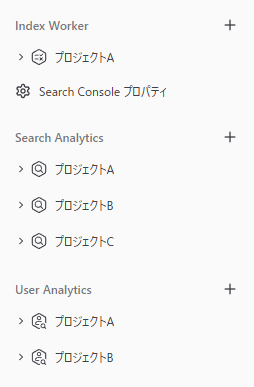
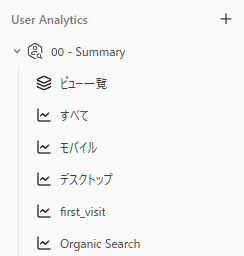
Project Organization Examples
Section titled “Project Organization Examples”-
If you have multiple sites, create separate projects for each site.
-
Create dashboard-style projects organized by the data themes you want to list and compare.
🎨 Some plans have limits on the number of projects.